 Try it Free
 Try it Free
Getting irritated because you are all set with drafting and proofreading but still unable to send emails from your IMAP account is completely natural. This can be due to the error "Your IMAP server has closed the connection. This may occur if you have left the connection idle for too long." It is important to remove the issue from root within time to restore the communication line and avoid hiccups from the workflow.
To resolve IMAP server timeout error, you need some reliable methods that guide you throughout the process for a hassle-free fix. Whether you’re using Outlook, Thunderbird, Gmail, or Apple Mail, you can refer to this guide to fix IMAP Server timeout issue thoroughly.
Well, all your worries are going to end with this article. Read it to the last to find the best solutions to transfer data with zero data loss and 100% accuracy.
What are the common reasons for IMAP connection timeout?
Some common reasons that can show IMAP Server timeout error in your IMAP email application include:
Slow connectivity: Slow internet connection or poor Wi-Fi network causes delays in response times, which results in server timeout.
Incorrect server settings: Entering wrong server configuration, such as port number, encryption details, hostname, or other authentication information can show you errors when sending emails.
Conflicting add-ins: Faulty add-ins or plugins installed within your email application can create disturbances in email messages. Outdated email applications can also be the reason of the errors.
Corruption in data files: When there is corruption in the data files, you might notice errors during email communication.
Firewall issues: Problems with the firewalls implemented and server outages/ maintenance lead to connection errors.
Common fixes for IMAP Server Timeout error
Here are some common troubleshooting tips that you can try to fix IMAP Server Timeout error:
- Fix internet: First thing, check that your internet connection is stable and working fine. You can restart the router device and check the connection on different devices.
- Verify the server settings: Verify that you’ve configured the right IMAP server settings (server address, port number, and credentials).
- Update email application: Make sure that email client you’re using is updated to its latest version available.
- Check for port number: Analyze the server settings to check if there is any security software that might be blocking any port like 993.
- Avoid large attachments: Make sure that you manage your large attachments and store them outside of your IMAP mailbox.
What are the methods to fix IMAP connection timeout issue?
Follow the methods below to resolve IMAP server timeout error:
Disable firewall and antivirus
Sometimes, due to firewall or some third-party antivirus software, you might encounter server timeout error. Here are the steps to disable a firewall:
- On your Windows computer, search for Windows Firewall and open its settings.

- Tap on the Turn Windows Firewall on or off option from the left pane.

- Select Turn off Windows Firewall under all network settings and click OK.

Now try sending emails through your IMAP email application to see if the issue is resolved.
Increase server timeout in Thunderbird
In Thunderbird, you can increase the server timeout value that gives your computer additional time to build the connection with the server. When server takes time to connect and respond due to slow internet or other issues, you can see the error IMAP server timeout. Follow the steps below to increase server timeout:
- Launch Thunderbird and click Settings.
- Select Disk Space and tap on Config Editor.
- In the search box, enter Mailnews.tcptimeout and change the time limit from 100 to 300 at maximum to avoid errors.
- Close Thunderbird application and re-launch it to send emails.
This solution might help you fix the connection to server timed out error in Thunderbird and send email messages without disturbances.
Adjust server timeout in Outlook
Another method that you can use to resolve IMAP server timeout error is adjusting the timeout value in Outlook. Follow the given steps:
- In Outlook, go to File, then Account Settings > Account Settings.
- Select you IMAP account and then click Change.
- Click More Settings and go to the Advanced tab.
- In the Server Timeout slider, drag the slider to set to 10 minutes.
- Hit Apply and then OK.
Exit the app and restart Outlook to see if this removed the issue.
Reduce your mailbox size
You can manage your mailbox size to handle the issue for efficient performance. To reduce mailbox size in Outlook, we will use the Mailbox Cleanup tool as explained in the steps below:
- In Outlook, go to File, and click on Info.
- Select Tools and click on Mailbox Cleanup tool.
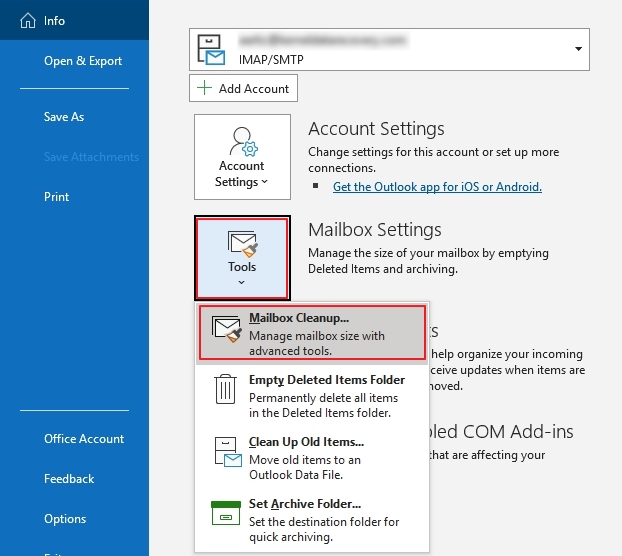
- Here you can View Mailbox Size to manage the size.
- Use the Find option to identify data larger than the specified size.
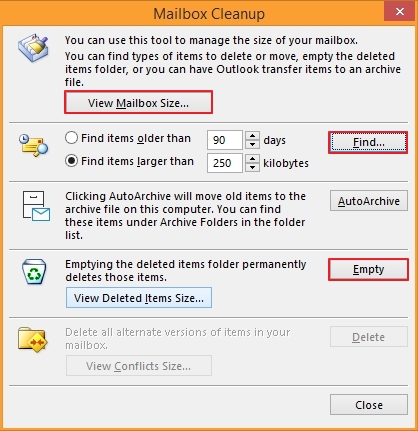
- Click on Empty to empty deleted items folder and use Delete option to delete all alternate versions of the mailbox items.
How to preserve data against server timeout issue?
With these methods as described above, the IMAP Server timeout error can be resolved within the email client. However, there is no guarantee that this issue won't come up again. This induces risk of data loss, which demands a foolproof strategy to secure the crucial data.
With the help of a proper IMAP backup tool like Kernel IMAP Backup & Restore, you can save the backup of your data during IMAP Connection Timeout errors. It allows you to backup emails from IMAP account to PST, EML, MSG, HTML, and other file formats. You can save the output file within your local or network-attached storage for easy offline access. The tool allows you to backup data from more than 20 IMAP-based email clients, including Outlook, Gmail, Thunderbird, Yahoo, Zoho, etc. Moreover, you can also backup emails directly to the web-based email clients or to Office 365 groups.
Conclusion
IMAP server timeout issue is unpredictable and can annoy users as it tends to halt the sending of email messages. Learning about the reasons and solutions, you can fix IMAP server timeout issue without any issues. However, there is a huge risk of losing data during such processes, which is why we recommend that you backup IMAP server emails using Kernel IMAP Backup & Restore software. The tool assures you of saving emails without altering the integrity or structure of the data during the process.
Frequently Asked Questions
Question: What are the possible causes of IMAP connection timeout error?
Answer: This error in IMAP server can be due to:
- System outages
- Internet connectivity
- Faulty add-ins
- Improper server configuration
Question: What are the tips to avoid this error?
Answer: To avoid seeing the error IMAP Server timeout, you can manage large attachments within the email messages and try connecting a smaller number of devices to one IMAP account.


Best tool to backup IMAP mailboxes in PST, EML, MSG or other file formats.